Themes and typefaces
Themes, on the editor's bar, opens the studio: the controls on the left and the whole page drawn beside them, at a real width, repainting as you work. Two things are decided in that panel and they do not behave alike.
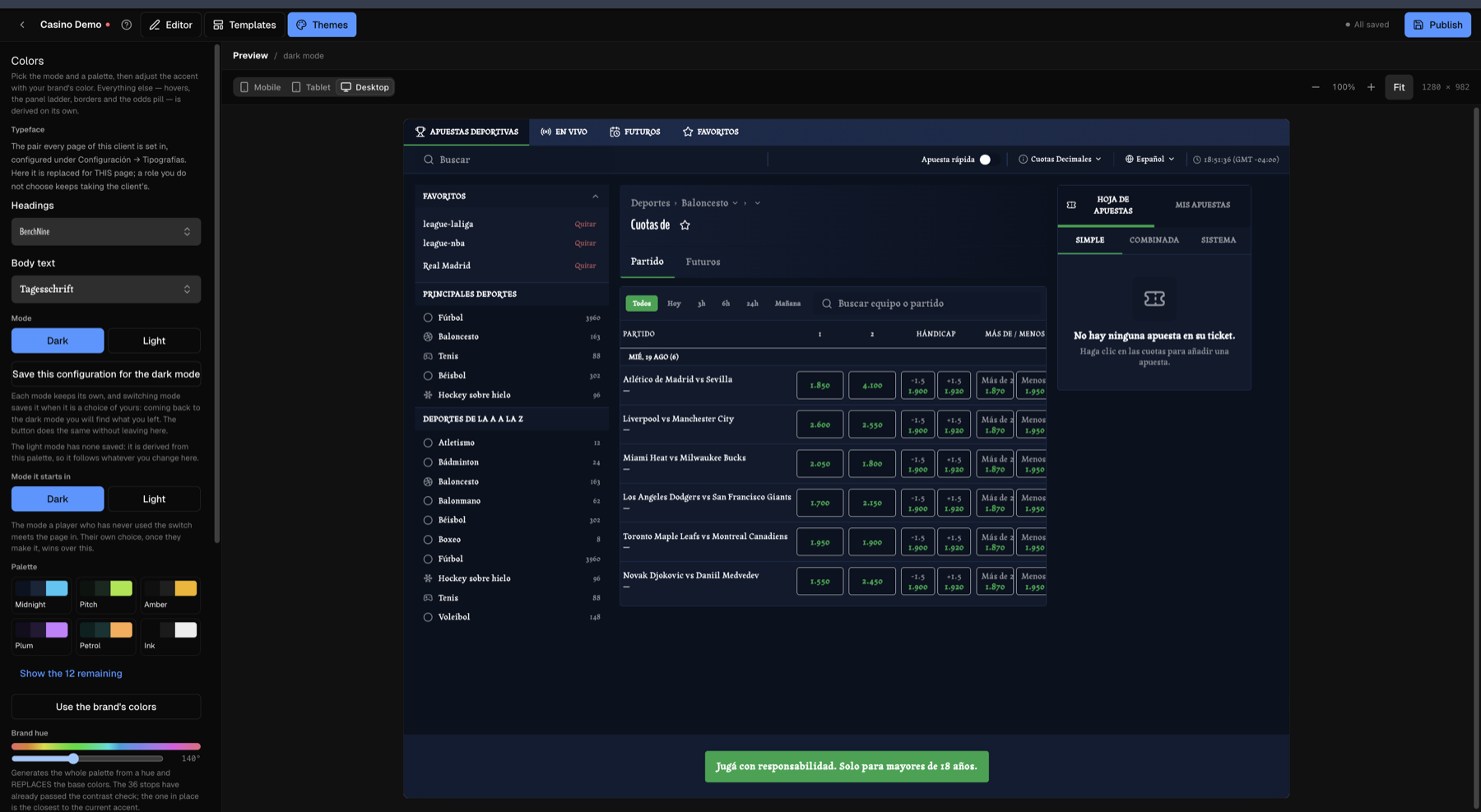
- Part of the page you are composing.
- Kept in the draft and carried by every version.
- No player sees them until you press Publish.
- Restoring an older version brings its colours back with it.
- The page's own, set in the editor's General settings.
- Confirmed on the spot: Typography saved.
- Live on the page with no publish.
- Not part of the document, so no version restores an old face.
The studio, top to bottom
| Control | What it decides |
|---|---|
| Mode | Which of the two modes you are editing and looking at. |
| Mode it starts in | The mode a player who never touched the switch meets. |
| Palette | A finished set of colours for the mode you are in. |
| Brand hue | Builds a whole palette from one hue and REPLACES the base colours. |
| Base colours | The five colours everything else is derived from. |
| Text on accent | Automatic by contrast, or set by hand. Back to automatic returns it. |
| Corners | How round every corner on the page is. |
Base colours, and what is derived
Five colours are picked by hand. Each one paints a part of the page you can point at:
| Colour | Paints |
|---|---|
| Accent | Buttons and the active odds. |
| Background | The app's canvas. |
| Surface | Cards and panels. |
| Success | Won, confirmed. |
| Danger | Errors, lost. |
Everything else is derived from those five: the hovers, the ladder of panels, the borders, the card, the popover, the odds pill, the header strip, the form fields and the two text inks. There is no control for them and there is no list of them to open — a colour you cannot find in this panel is one the platform works out from the five above, and it moves when they move. That is why touching Accent visibly moves a dozen things at once.
Text on accent is worked out from the contrast by default. Set it by hand and the panel says so; Back to automatic gives the decision back.
Light and dark are two configurations
Not one palette dimmed. A page holds a set of colours for light and another for dark, and the studio edits one at a time.
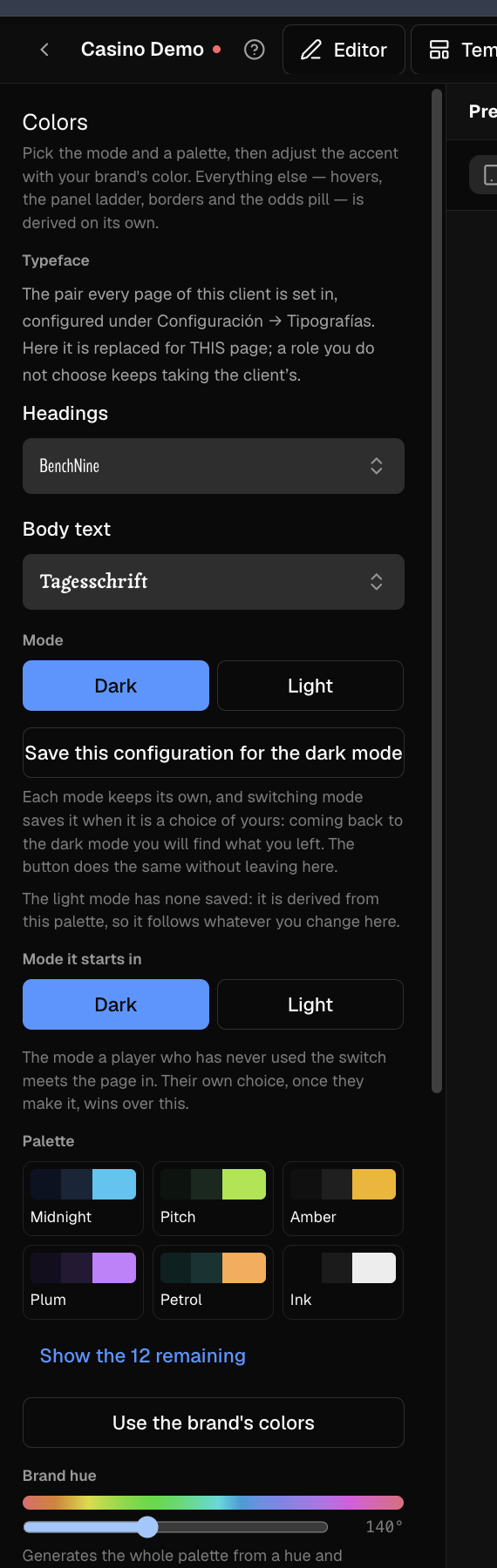
Mode is where you are standing: it says which of the two you are editing. The light/dark switch above the canvas moves the same cursor and is safe — it pins the starting mode before it moves — while this row does not, so a page that has never had Mode it starts in set will open for players in whichever mode you leave this row on. Switching it files what you are leaving under its own mode — when it is a choice of yours and not a derivation you were only looking at — and brings the other mode's, deriving one from the current palette when that mode has nothing saved.
Save this configuration for the light mode (or dark) is the only way to turn a derivation you liked into a decision. It files the palette in front of you under that mode, so switching away and coming back brings it back exactly as you left it. It does not freeze anything: keep changing a colour and the button comes back, offering to file the new one. The grey line under the button says which of the two is true of the OTHER mode: it is derived from this palette, so it follows whatever you change here, or it has its own saved configuration, so it does not follow this palette. Read that line before you decide you are done.
Mode it starts in is a separate row, but it only becomes a separate question once you have used it: until somebody presses that row, the mode a player meets is whatever Mode is left on — and Mode also moves on its own when you click a palette card or drag the brand hue. Set Mode it starts in explicitly before you publish. A player who does use the page's switch keeps their own choice, remembered in their browser, per page.
Palettes and the brand hue both replace work
The grid offers the palettes of the mode you are in — six at a time, the rest behind Show the N remaining. Clicking one writes its colours over the base colours and sets the mode to match. Your corners survive; a colour you had typed by hand does not.
Brand hue generates a whole palette from a single hue and REPLACES the base colours. Every stop on the rail has already passed the platform's contrast check, so dragging it cannot leave the page unreadable — which is also why the rail may offer fewer stops than a full turn of colour.
Both controls discard hand-typed colours. Pick the palette first, paste the brand's hex after.
Use the brand's colours appears only on a page whose stored identity carries colours of its own. A page that stores none, or stores exactly the platform's own colours, does not see the button.
Corners
One control, four options: Straight, Subtle, Soft — the one a page starts on — and Round. It reshapes every card, button, pill, input and panel of every block at once, and it survives a palette change.
Checking the colours before publishing
The right-hand column is the same renderer the published site runs, in the mode you are editing. It is not a picture: open the bet slip, unfold a panel, work the controls inside a block — a large share of the colours you are deciding only appear inside those. Navigating is the exception: on this screen the page's own navigation tabs do nothing, and the strip keeps marking the page the preview opened on.
Page to check picks which page of the document is drawn; it appears once the document has more than one. The device bar draws the page at a phone's, a tablet's or a desktop's width — 390, 834 and 1280 pixels. The fixtures and the numbers are sample data. Preview, in More, is the one screen that draws the real catalogue.
When one block has to disagree
Select the block and open Block colours in its settings. Four roles — Background, Text, Accent, Border — written into one of three registers:
| Register | Paints |
|---|---|
| Both | Light and dark alike. |
| Light | Light mode alone, and it beats Both. |
| Dark | Dark mode alone, and it beats Both. |
A register with nothing in it does not mean "no colour": it means whatever Both says, and the panel says so under the field. Back to the theme clears one role and hands it back to the palette.
The top row of the colour picker is the page's own theme — Accent, Soft accent, Primary, On accent, Border. Picked from there the block follows the palette whenever you change it, and the panel reads Theme color · changes with the palette. Free colour stores a fixed value and reads Fixed value · does not change with the theme: that block will sit out the next rebrand. It is the one decision here whose cost arrives months later.
A text colour that is hard to read over the background or over the accent is applied anyway, with a line saying so. The judgement is yours.
See Blocks and sections for the rest of a block's settings.
What picking a template does to the colours
Picking a template erases what is composed on the page, and the colours go with the composition:
- A template that carries a palette of its own replaces the page's colours with it.
- One that carries none starts from the colours stored on the page's identity, and from the platform's own palette when there are none.
- Each card in the gallery is drawn in the colours it will produce, so what you see on the card is what you get.
The new colours are written to the draft like any other change: players see them when you publish. See Templates and Versions and publishing.
Saving the page as a template seals its colours into it. The typefaces are not part of a template — they belong to the page.
The two typefaces
Every page is set in two faces of its own, chosen in the back-office. The landing and the sportsbook of a page share them; no template or document carries a face.
| Role | Sets |
|---|---|
| Headings | The page's titles and section headings. |
| Body text | Everything else the page sets in type. |
Where to set them
In General settings, in the editor's left bar under Versions. The canvas repaints in the new face once it is saved.
A pick is saved the moment you make it: the back-office confirms Typography saved., and the page — the landing and the sportsbook alike, the embedded widget included — serves the new face on its next load. There is nothing to publish and nothing to undo from the version history. A change can take up to a minute to reach a page already being served.
Settings → Typefaces is a different setting: it is the back-office's own typeface, and it never reaches a page.
Where a face comes from
- 1The pageGeneral settings in the editor. The pair this page is set in.
- 2The bundled faceGeist, which ships with the platform. What a page is set in when it names nothing.
The picker
Both pickers read the platform's font catalogue. Type at least two letters and the list is searched on the server, so a family in the catalogue is found whether or not it is on the screen in front of you; each row is drawn in its own face, and so is the pick once the picker is closed.
The foot of Settings → Typefaces says how many families the catalogue holds and when it was last fetched, with Refresh catalog beside it. A refresh that wrote nothing reports a warning rather than a success — a catalogue that went stale looks exactly like one that is fine.
Who can change what
| To do this | An account needs |
|---|---|
| Open the editor at all, and so the studio | Permission to edit the page. Without it the editor refuses to open; there is no read-only theme view. |
| List families in either picker | Permission to read platform settings. Without it the picker reports that the catalogue could not be read. |
| Save the page's pair, in the editor's General settings | Permission to edit the page, the same that opens the editor. |
See Back-office basics for roles and what they carry.
What Themes is not
Three nearby controls change something other than the page, and operators reach for all three:
| Control | What it actually paints |
|---|---|
| Settings → Appearance, brand colour | The back-office. Never the page. |
| The light/dark toggle in the account menu, at the foot of the back-office sidebar | The administration interface, the editor's own chrome included. The canvas keeps painting the page's mode, not the back-office's. |
| Settings → Typefaces | The back-office's own typeface. Never a page. |
Next: Navigation — the bar the player reads first.